Pixelcraft Crayon: Your Go-To for Playful, Colorful Design
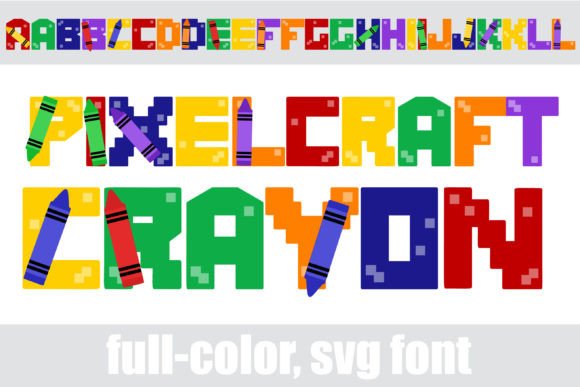
Finding a font that captures a sense of fun and nostalgia without looking amateurish is a common challenge for designers and creators. You want something that feels handmade and energetic, but still holds up in a professional context. This is where Pixelcraft Crayon enters the conversation. It’s not just another handwritten font; it’s a full-color SVG typeface that combines the charm of a child’s crayon drawing with the precision of pixel art.
At its core, Pixelcraft Crayon is a premium font with a distinct personality. Each character is constructed from a mosaic of pixels, but rendered to look like it was drawn with a thick, waxy crayon. The built-in color palette is bright and saturated, immediately evoking a sense of creativity and approachability. What makes it particularly versatile is the inclusion of alternate color cases. This means within your system’s character map, you can access different color variations for each letter, allowing for subtle customization without needing to manually recolor each glyph in your design software.
Where This Creative Font Truly Shines
Pixelcraft Crayon is, first and foremost, a display font. Its bold, textured nature makes it unsuitable for long blocks of body text, but it excels in situations where you need to grab attention and inject personality. Think of it as a headline specialist.
For logo design and brand identity, especially for brands targeting families, children, educational services, or creative hobbies, this typeface can be a cornerstone. Imagine it on a daycare center’s signage, a craft blog’s header, or the logo for a line of artisanal kids’ toys. It communicates warmth, imagination, and fun instantly. In packaging design, it can make a product stand out on a shelf, suggesting a playful experience inside.
The font is a powerhouse for social media graphics and digital content. Its high-impact visual style is perfect for Instagram quotes, YouTube thumbnails, or Facebook ads where you have a split second to make an impression. It translates well to web design for hero section titles or call-to-action buttons where you want to break from corporate rigidity. For editorial design, it could be used for pull quotes or section headers in a magazine targeting a creative audience.
Making It Work: Practical Tips for Your Projects
Adopting a unique creative font like Pixelcraft Crayon requires a thoughtful approach. The first step is always to consider your project’s tone and audience. Is the goal to be whimsical, energetic, or nostalgic? Does your audience expect professionalism with a twist, or outright playfulness? This font leans heavily toward the latter, so aligning it with your brand’s voice is critical.
A key technical note is its nature as an OpenType full-color (SVG) font. This means it’s installed like any standard .otf file. However, its color rendering depends on software compatibility. In programs that fully support SVG fonts—such as Adobe Illustrator, Photoshop, Silhouette Studio, QuarkXPress, and Inkscape—you will see the vibrant colors as intended. In non-compatible programs, the font will default to black. This is important to remember during the design process; always test the font directly in your primary design application, not just in a font preview window.
When it comes to font pairing, balance is everything. Pair Pixelcraft Crayon with a clean, simple sans serif font or a neutral serif font for body text. This creates a clear visual hierarchy, allowing the crayon font to own the headlines while the supporting typeface ensures readability for longer paragraphs. Avoid pairing it with other highly decorative or handwritten fonts, as this can create visual chaos.
A Design Asset with Considerations
Like any strong design asset, Pixelcraft Crayon has its ideal use cases. Its textured, pixelated style offers excellent readability at large sizes for titles and posters. For smaller applications, however, the intricate detail can become muddy. Always test your designs at the intended output size, whether for a printed poster or a mobile screen.
From a branding perspective, consistency is key. If you choose this font for your brand identity, use it strategically and consistently—perhaps only for main headlines or specific campaign elements. This builds recognition without overwhelming your audience. The alternate color characters offer a unique way to add subtle variation while maintaining a cohesive look.
Ultimately, Pixelcraft Crayon is more than just a font type; it’s a mood setter. It’s a tool for designers, marketers, and creators who want to break away from the sterile and inject a dose of handcrafted joy into their work. Whether you’re designing a poster for a community event, crafting social media posts for a bakery, or developing the visual language for a new children’s app, it provides a ready-made personality that’s hard to ignore. Just remember to pair it wisely, test it thoroughly in your workflow, and let it handle the headlines where its unique character can truly sing.